Follow these steps to deposit via Wave on Winners.gm:
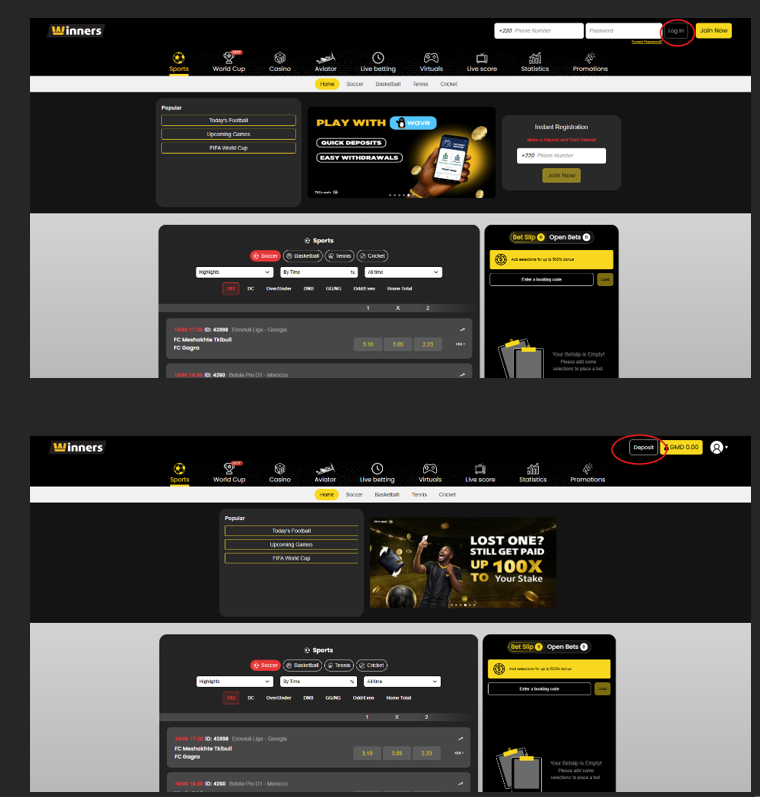
Log in to your winners account:
Access your winners account using your credentials.
Click on the “Deposit” button:
Once logged in, locate the Deposit button and click on it.
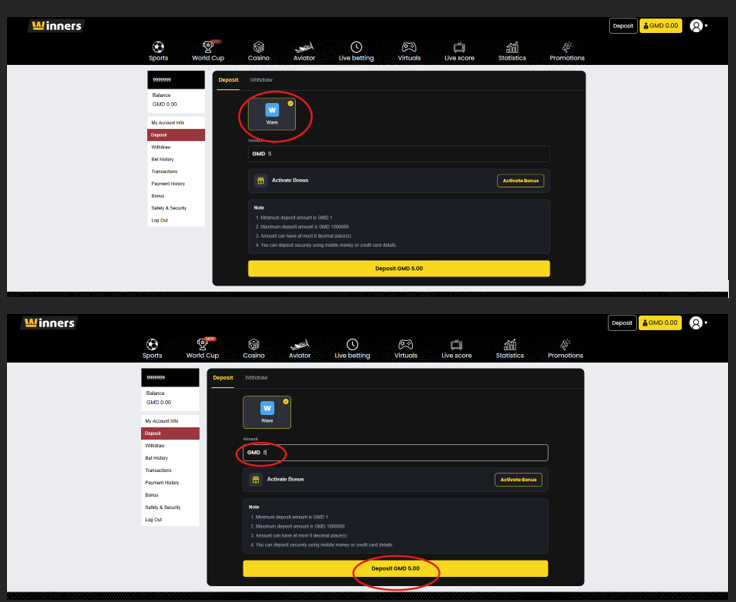
Select the “Wave” payment method:
Enter the amount you wish to deposit and click on “activate bonus” if you wish to activate any bonus available.
Now click on “Deposit” to confirm the deposit.
Confirmation in the Wave app:
You will be taken directly to your Wave app for confirmation.
Click the “Confirm” button in the Wave app.
Just make sure you have the Wave mobile app on your phone.
Choose your deposit amount and click deposit.
Confirm your deposit through your Wave application or scan the QR code on the desktop version of your Bwinners account.
Note: The phone number you use to make the withdrawal must match the phone number linked to your account.