





FAQ - Generals

  1. Log in to your mellybet.gm account.
  2. Just tap the My Profile button (person icon) at the top-right of your screen
  3. Your User ID will be shown right under your name


  • Minimum deposit amount is GMD 10 – you can deposit at least GMD 10 in one transaction.
  • Sports Betting minimum stake is GMD 1 per bet.
  • If you have any issues, please contact the support team;  support@mellybet.gm

 or +220 872122111

Betting is quick and easy:

  1. Log in to your MellyBet Account
  2. Pick your favorite sport, game, or market.
  3. Tap the Betslip icon in the footer.
  4. Enter your stake and hit Place Bet.

And that’s it — your bet is live!

Betting is quick and easy:

1️⃣ Log in to your MellyBet Account
2️⃣ Choose your preferred sport category
3️⃣ Select your matches
4️⃣ Enter your stake and tap Place Bet

That’s it — your bet is live!

1️⃣ Log in to your MellyBet Account
2️⃣ Go to the Casino Lobby
3️⃣ Choose your favorite casino game
4️⃣ Start spinning and enjoy the action!

Good luck and have fun playing!

  • To check bet slips, login to your account,
  • Click my bets and then check bet slip.
  • All your bets will display, don’t forget to set between which dates you want to see the
    bet slips i.e. default is today’s bets, past 3 days, a month ago, etc.

Your Free Bet is available when a bonus is active on your account.

Follow these steps:

1️⃣ Pick 5 matches, each with minimum odds of 1.50
2️⃣ Add all selections to your Betslip
3️⃣ On the Betslip, select “Bonus Wallet”
4️⃣ Enter the required stake amount
5️⃣ Click Place Bet

That’s it! Your Free Bet is now active — enjoy the excitement of betting.

You can place up to 50 games / matches

1. Go to mellybet.gm
2. Click to 3 dots at the top right of your screen on Google Chrome
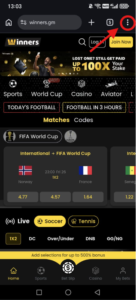
3. A banner saying “Add to Home screen” will appear — tap it.
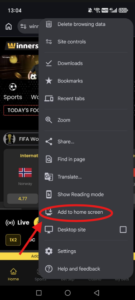
4. Confirm the installation on the pop up window, the app icon will appear on your home screen.
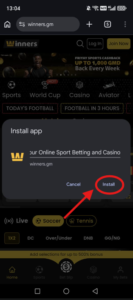
1. Go to mellybet.gm
2. Click the 3 dots at the bottom right of your screen on Safari
3. Click “Share”
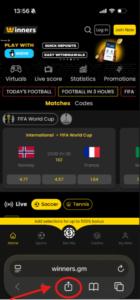
4. Click “View More”
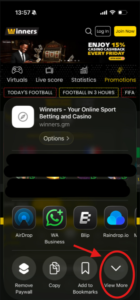

5. Click “Add to Home Screen”
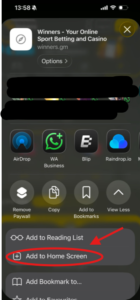
6. Click “Add” and the app icon will appear on your home screen
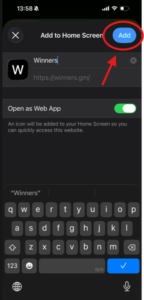
Customer care phone number: +220872122211
Email: support@mellybet.gm

You, the customer, are very important to us and that’s why we put a great deal of time and energy into customer service. We pride ourselves on our speed, efficiency and friendliness when dealing with any questions or queries that may arise.